Known Limitations
Every useMango™ test has practical limits on its size and structure. This page documents the current limits so they can be planned for when designing tests.
These limits aren’t enforced while you’re building a test - the test designer won’t stop you from exceeding them, though it becomes noticeably slower to work in as a test approaches 989 steps. The limits are checked when you run the test: if either is exceeded, the test fails immediately when execution starts, and an error is shown in the client.
Maximum steps per test
A test can contain up to 989 steps in total - and that’s a single, shared budget. Every step counts toward it, regardless of where it comes from: written directly in the test, pulled in from a composite component (however deeply components call into each other), taken through a junction branch, or repeated by a loop, counted once per iteration. Scripted components are counted the same way as standard ones, with no exemption from this limit.
Composite components, junction branches, and loops are also each capped at 989 steps of their own, independently of how many times they’re used elsewhere.
The test designer doesn’t show a test’s total step count anywhere, so for longer tests, a separate count of the number of steps will need to be maintained. The sequential number shown on each step can help with this - the number on the last step reflects how many steps are currently written in the test. Since loop iterations and junction branches affect how many steps actually run, a test can have more than 989 steps written in it and still execute successfully, as long as the steps that actually run when it executes stay within the limit.
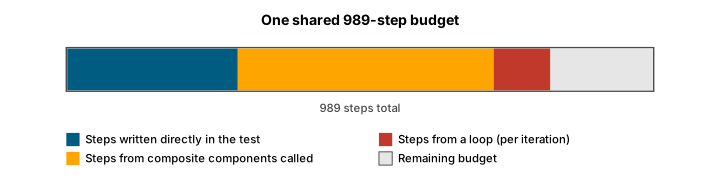
We recommend against building tests with anywhere near 989 steps. Break large tests down into composite components to keep them easier to read and maintain - but remember a composite’s steps still count toward the same 989-step total wherever it’s used, so this won’t raise the ceiling.
Maximum image identifiers and tables per test
Image identifiers (screenshots used by image-recognition steps) and tables (data tables used by test steps) share a fixed 4.5 MB budget with the test’s own steps and other test data - project and environment variables referenced by the test count toward this budget too. Each individual image identifier or table is capped at 200 KB on its own.
A test using the maximum 989 steps only uses about 620 KB of the 4.5 MB budget, leaving roughly 3.9 MB for images, tables, and other test data - so steps rarely have much impact on how many images or tables a test can use. The table below shows roughly how many images or tables a test can use at different average sizes; an image and a table of the same size count identically against the budget:
| Average size (image or table) | Approximate maximum combined images and tables per test |
|---|---|
| 2 KB | 1,400 |
| 50 KB | 65 |
| 200 KB (individual size cap) | 16 |
In practice, larger images and tables are usually the largest contributor to this budget, but steps, other test data, images, and tables all share the same fixed total - using more of one leaves less room for the others.
Image identifiers can’t be compressed without risking image-recognition steps that rely on pixel-perfect matching. If a test needs many image identifiers, keep each one as small as practical - crop to just the recognizable region of the screen rather than capturing the full screen - rather than relying on compression.